Managing e-obs logger data
e-obs handheld devices provide logger.bin files that can contains multiple file types:
- movement (GPS)
- acceleration (ACC)
- magnetometer (MAG)
- inert measurment unit (IMU)
- heart rate (ECG)
and possibly other data types.
Firetail’s e-obs module allows you to manage these data locally.
Settings
Archive path
Select
File > Settings > e-obs Data Management
and select an empty folder to be used as e-obs archive path. Imported data will be managed in this folder.
Caveat: ensure the selected location is part of your regular backups! Firetail does not keep remote copies or external duplicates of these data.
e-obs decoder
In the decoder path field select the e-obs decoder binary as downloaded from the e-obs website.
Import Data
Open
File > e-obs Data Management > Import e-obs logger.bin files
and select one or more logger.bin files. After the data is imported you can review the imported files. An abstract timeline visualizes the timespan for each data type.
In this stage Open in Firetail is not enabled. To open the data, use Show Data as outlined below.
Regions marked in red indicate overlaps of time-ranges between extracted files of the same sensor type.
Show Data
File > e-obs Data Management > Show Imported e-obs Data
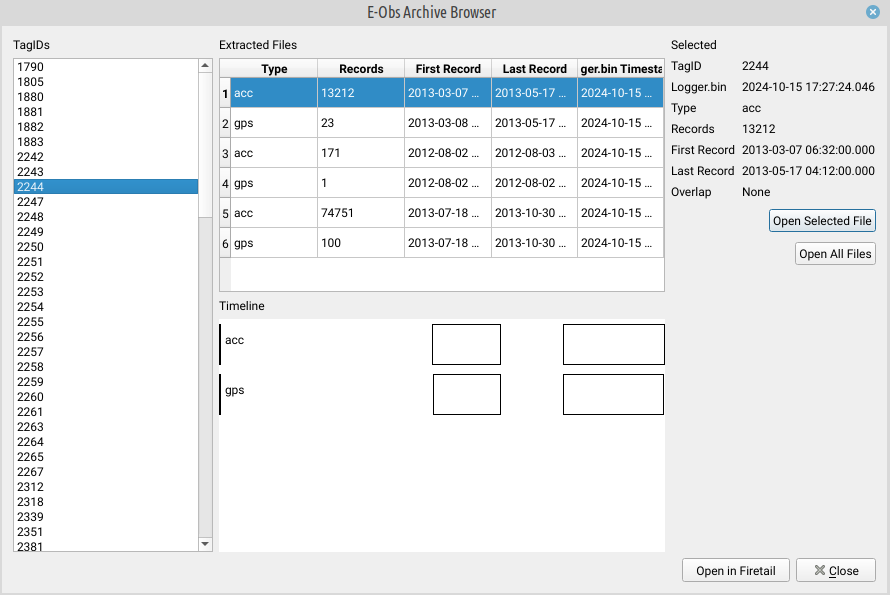
Opens a browser listing every tag found across your imported logger.bin files. Selecting a tag shows its extracted files in the same timespan timeline as during import, including any red overlap regions.
Select a tag and click Open in Firetail to load its data.
Repeated readouts of the same tag
If you download data from the same physical tag more than once there is no need to merge the files yourself or pick just one.
Firetail identifies a tag by the tag ID embedded in the decoded data. All readouts of the same tag are then grouped together, even if their time ranges overlap.
Firetail merges all readouts per data type into one continuous, time-sorted file and removes identical duplicates automatically. If two readouts contain a record with the same timestamp but different values, Firetail will emit a warning listing the conflicting records when opening the data for further investigation.
The red overlap regions in the timeline are a preview of where this merging will happen.